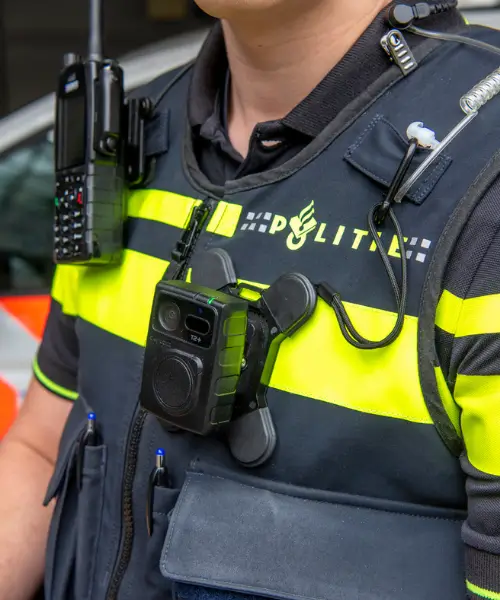

Successfully using a bodycam is about much more than simply turning it on. It requires correct, consistent, and responsible use in every situation. These key practices offer clear and practical guidance to help you get the most out of your bodycam while promoting safety, transparency, and professionalism during operations.
Identification & Responsibility
1. Link your bodycam to your user identity
Always ensure each recording is linked to your personal ID, using either a fixed or dynamic assignment system.
Preparation
2. Treat your bodycam as part of your operational kit
Handle, wear, and maintain your bodycam with the same care as other essential equipment. Report any faults or damage immediately.
3. Check your bodycam before each shift
Inspect for visible damage, verify battery levels, and ensure the lens and microphone are clean and fully functional.
4. Keep the lens, microphone, and contact points clean
Wipe away any dirt or grease to ensure clear recordings and reliable charging and data transfer.
5. Secure the bodycam properly
Mount the camera firmly at chest height, free from obstructions. Always check that the safety lanyard is attached correctly if one is used.
During Operation
6. Start recording early
Begin recording before a situation escalates. Use the pre-recording feature where available to capture crucial lead-up moments.
7. Monitor the LED status indicators
Regularly check the LED lights to confirm that recording, charging, or error statuses are as expected.
8. Respect privacy
Only record when necessary and always comply with privacy regulations. Avoid recording in private areas unless absolutely essential.
9. Inform individuals when appropriate
Where it is safe and practical, make people aware they are being recorded.
10. Monitor your battery level throughout your shift
Monitor your battery status, particularly during long shifts or livestreaming, to avoid unexpected shutdowns.
11. Use live streaming intentionally
Only use live streaming when direct support, real-time oversight, or urgent action is needed.
12. Use tags to mark important moments
Use the tagging function during recording to highlight important events. Tagging helps speed up the review, retrieval, and reporting of key incidents.
13. Move smoothly to keep footage stable
Avoid sudden or uncontrolled movements while wearing your bodycam. Smooth movement improves your recordings’ stability, clarity, and evidential quality.
After the Shift
14. Transfer and verify your data securely
Offload your recordings using an authorised docking station or secure Wi-Fi/4G connection, and always verify that all files have been successfully uploaded and stored.
Data Management & Handling
15. Treat recordings as legal evidence
Store recordings securely and comply with all retention policies and legal requirements.
16. Apply redaction before sharing
Use approved redaction tools to blur faces and number plates and mute sensitive audio when necessary.
17. Use metadata effectively
Use timestamps, user IDs, and GPS data to aid in reviewing incidents and managing evidence.
18. Keep your bodycam firmware and software updated
Install firmware and software updates promptly to maintain optimal security and functionality.
Training
19. Provide training for all users, including new staff
Train all users, including new team members, on bodycam handling, operational deployment, and the use of supporting software. Refresh skills and knowledge regularly through follow-up training sessions and updates.
Maintenance
20. Maintain bodycams and docking stations regularly
Keep bodycams and docking stations clean, dry, and free from dust or grease. Regularly inspect connection points, contacts, and cables for damage. Ensure docking stations operate correctly to guarantee secure data transfer and reliable charging. Schedule technical maintenance checks where needed.
Use these key practices as part of your daily operations. Careful and consistent use of your bodycam not only protects you but also promotes greater transparency, safety, and trust within your organisation!
Optimise Your Bodycam Operations
Achieving effective bodycam use starts with proven solutions and expert support. Discover how ZEPCAM helps organisations achieve operational excellence with reliable bodycam technology and secure data management.
View our solutions or contact us for advice.